Site Settings
Customize site-specific settings for optimal form filling behavior, performance delays, environment variables, and data exports.

 Site Settings Overview
Configure how the extension handles form filling operations, execution delays, browser tabs, captcha solutions, and environment variables for the active site.
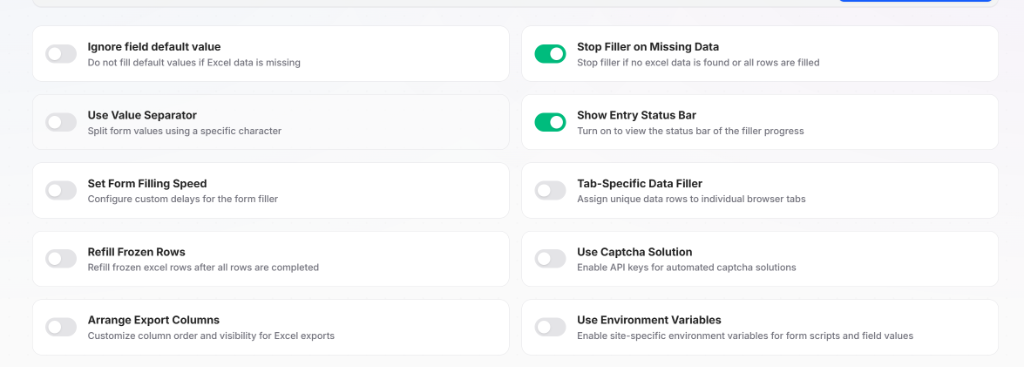
| Setting | Description | Default / Options |
|---|---|---|
| Ignore field default value | Do not fill default values if Excel data is missing. | Toggle ON / OFF |
| Stop Filler on Missing Data | Stop filler if no Excel data is found or all rows are filled. | Toggle ON / OFF |
| Use Value Separator | Split form values using a specific character (e.g., newline \r\n, comma ,). | Toggle ON / OFF (Custom separator) |
| Show Entry Status Bar | Turn on to view the status bar of the filler progress on active pages. | Toggle ON / OFF |
| Set Form Filling Speed | Configure custom execution delays for the form filler. | Toggle ON / OFF |
| Tab-Specific Data Filler | Assign unique data rows to individual browser tabs to prevent duplicates. | Toggle ON / OFF |
| Refill Frozen Rows | Refill frozen Excel rows automatically once all rows are completed. | Toggle ON / OFF |
| Use Captcha Solution | Enable API keys for automated captcha solving on this site. | Toggle ON / OFF |
| Arrange Export Columns | Customize column order and toggle visibility for exported Excel files. | Toggle ON / OFF |
| Use Environment Variables | Enable site-specific environment variables for form scripts and field values. | Toggle ON / OFF |
Field Default Value Behavior
- When OFF (Default): If Excel data is missing or empty while filling a form, the field's configured default value is filled automatically.
- When ON: Default values are skipped entirely if no Excel data is provided for that field.
Value Separator for Multi-Value Fields
When working with multiline inputs or multi-select dropdowns, set the value separator to \r\n to split lines, or , / ; for delimited items.
Multi-Tab Automation
When Tab-Specific Data Filler is enabled, each browser tab is assigned an isolated row from the uploaded .xlsx data sheet. This enables high-speed parallel form submissions across multiple tabs without data collision.
 Site Environment Variables
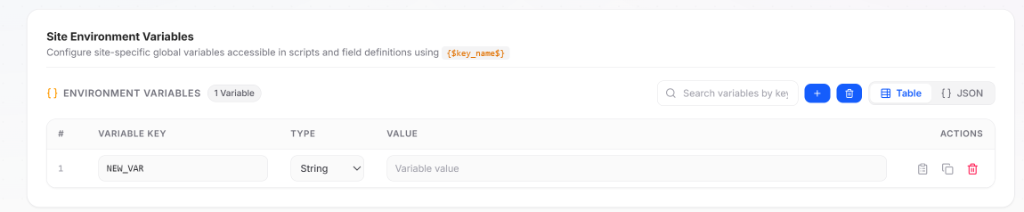
Site Environment Variables allow you to define reusable key-value variables that work across your entire site — including all forms, site pages, segments, and custom field scripts.
Site-Specific Scope vs Global Variables
Environment variables can be configured at two distinct levels:
- Global Environment Variables: Defined in extension settings and available extension-wide across all websites.
- Site Environment Variables (configured here): Isolated strictly to the current site. They are shared across all pages, forms, and scripts belonging to this site, but do not affect any other site.
Precedence Hierarchy
If an environment variable with the exact same key name exists in both Global Settings and Site Settings, the Site Environment Variable takes precedence and overrides the global value for all forms on this site.
Managing Variables
| Feature | Control | Description |
|---|---|---|
| Add Variable | + Button | Creates a new variable key-value row. |
| Delete Variables | Trash Icon | Delete selected or empty variable entries. |
| View Mode | Table / JSON | Switch between an intuitive visual table editor and raw JSON format. |
| Search Filter | Search Bar | Instantly filter variables by key name. |
| Variable Key | Text Input | Unique identifier used to reference the variable (e.g., BASE_URL, NEW_VAR). |
| Type | Dropdown | Data type: String, Number, Boolean, or Object. |
| Value | Input | Assigned variable content. |
| Row Actions | Copy / Clone / Delete | Copy value to clipboard, duplicate the row, or remove the variable. |
Syntax & Usage
Reference any site environment variable anywhere in form fields, expressions, or segments using curly braces and dollar signs:
{$key_name$}For example, if you configure a variable API_ENDPOINT with value https://api.example.com/v1, referencing {$API_ENDPOINT$} dynamically outputs https://api.example.com/v1 during form execution.
 Excel Export Column Arrangement
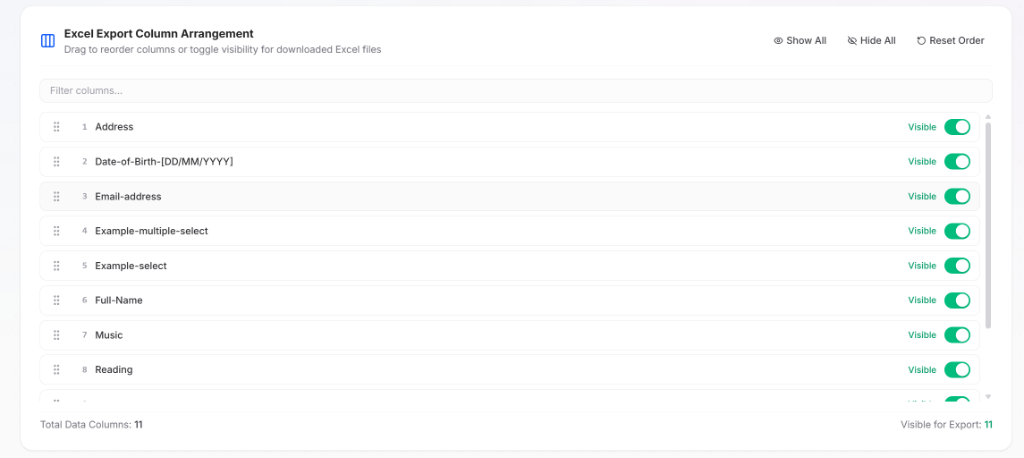
When Arrange Export Columns is enabled in the settings toggles, you can customize the structure and visibility of columns in exported .xlsx files.
Column Controls & Reordering
| Action | Control | Description |
|---|---|---|
| Drag to Reorder | Drag Handle (:::) | Click and drag any row handle to change the column sequence in exported Excel sheets. |
| Toggle Visibility | Visible Switch | Toggle individual columns ON or OFF. Hidden columns will be excluded from downloaded Excel files. |
| Filter Columns | Search Input | Quickly search and find specific columns by name in large datasets. |
| Show All | Header Button | Make all data columns visible in export with a single click. |
| Hide All | Header Button | Hide all columns from export. |
| Reset Order | Header Button | Restore the default column order from the original uploaded Excel sheet. |
Column Counter
The bottom status indicator displays real-time statistics:
- Total Data Columns: Total number of recognized columns in the dataset.
- Visible for Export: Number of columns currently set to be included in the exported file.
 Performance Settings
When Set Form Filling Speed is enabled, you can configure execution delays to ensure target forms process inputs reliably.
| Field Option | Description | Options / Range |
|---|---|---|
| Choice Form Filling Speed | Select form filling execution speed. | Fast (no delay) Medium (0.3s delay) Slow (2s delay) Random (min, max) |
| Min. Milliseconds | Minimum delay time when Random speed is selected. | 200, 500, 1000 |
| Max. Milliseconds | Maximum delay time when Random speed is selected. | 1000, 2000, 3000 |
Random Delay Range
The Min. Milliseconds and Max. Milliseconds inputs only appear when Random (min, max) is selected. This introduces human-like randomized delays between sequential field operations.
 Captcha Solution
Configure site-level CAPTCHA solving service API keys.
| Field Option | Description | Example Values |
|---|---|---|
| Use Captcha Solution | Enable or disable automated captcha solving for this site. | Toggle ON / OFF |
| Service Name | Supported captcha solving service provider. | 2captcha |
| Service API Key | Account API key from your captcha solving provider. | a1b2c3d4e5f6g7h8i9j0k1l2m3n4o5p6 |
How to Use
- Toggle Use Captcha Solution to ON.
- Confirm Service Name is set to
2captcha. - Paste your Service API Key obtained from your 2Captcha account.
- The key is automatically applied to all captcha challenge fields within this site.
Get API Key
Register at 2Captcha to obtain your API key from your user dashboard.
Priority Order
CAPTCHA credentials can be configured at three levels:
- Field Settings (Highest Priority — overrides site and global keys)
- Site Settings (Applies across all forms in this site)
- Global Captcha Settings (Applies extension-wide)
Related Documentation

 Site URL & Data Format Settings
Configure startup navigation, date parsing formats, and inspect column data from your uploaded .xlsx spreadsheet.
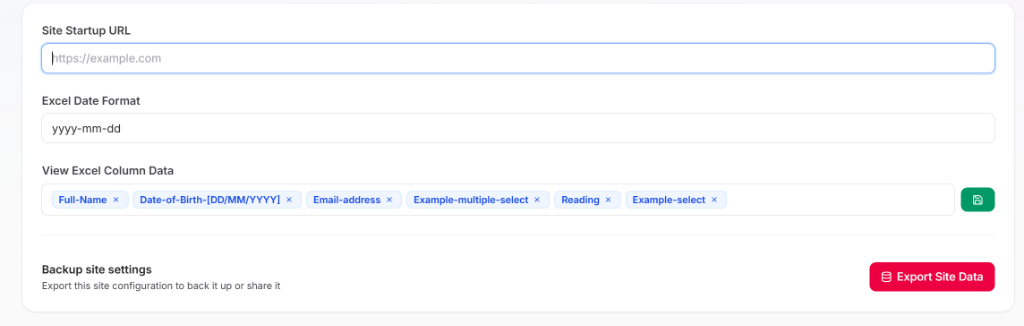
| Setting | Description | Example / Default |
|---|---|---|
| Site Startup URL | Target website URL for one-click launching and automated filler startup. | https://example.com |
| Excel Date Format | Format for parsing and filling dates from uploaded Excel files. | yyyy-mm-dd |
| View Excel Column Data | Search and select specific Excel columns to inspect values directly. | Tag picker with view button |
| Backup site settings | Export the complete site configuration into a JSON backup file. | Click Export Site Data |
Site Startup URL
When a Site Startup URL is configured, an "Open Site" action button appears on the site card. Clicking this button opens the target website in a new browser tab and automatically initiates form filling.
Excel Date Format
Controls how date values from your uploaded .xlsx spreadsheets are parsed and formatted when filling date-picker inputs and text fields.
Supported Date Formats:
yyyy-mm-dd— ISO standard date format (default)MM-DD-YYYY— Standard US date formatYYYY-MM-DD[T]HH:mm:ss— Full ISO datetime format
View Excel Column Data
Select one or multiple column tags (such as Full-Name, Date-of-Birth-[DD/MM/YYYY], Email-address) and click the green spreadsheet icon button to view and verify mapped column values from your active .xlsx sheet without leaving the settings page.
 Backup Site Settings (Export Site Data)
Export your complete site configuration for backup, sharing, or version control.
| Operation | Description | Action |
|---|---|---|
| Export Site Data | Backup current site configurations, forms, field rules, and settings. | Click the red Export Site Data button |
How to Use
- Click the red Export Site Data button in the Backup site settings card.
- Download and save the generated
.jsonbackup file. - Restore or migrate your configuration anytime via Global Settings > Import Site Configurations.
What is Included in the Backup
- Site metadata, title, and active status toggle
- All 10 site configuration switches and filling speed parameters
- All registered forms, pages, and element selectors
- Custom field definitions, validation rules, and segments
- Site Environment Variables and column export arrangements
Spreadsheets Managed Separately
The site export file contains site configuration structures and automation rules. Uploaded .xlsx spreadsheet rows are session-based and are not embedded inside configuration backup files.